Frosty Details: The Icicle Xmas Illustrator Pattern Brushes
When the holiday season approaches, the pressure mounts for designers and business owners to capture that elusive "winter magic" in their visuals. We often spend hours tweaking gradients and adjusting opacity masks to create the perfect frozen aesthetic. However, sometimes the most effective design assets are the ones that do the heavy lifting for you, allowing you to focus on the broader composition. This is where the Icicle Xmas Illustrator Pattern Brushes come into play. They aren't just a set of clip art; they are functional, dynamic tools designed to integrate directly into your Adobe Illustrator workflow, transforming standard vector paths into dripping, frozen ribbons of ice.
Why Texture Matters in Winter Branding
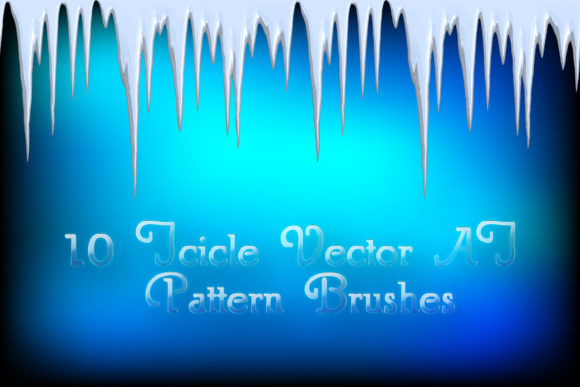
In the realm of modern typography and design, texture is often the differentiator between an amateur layout and a professional brand identity. During Q4, the visual landscape is flooded with generic reds and greens. To stand out, you need depth and realism. These brushes offer a distinct visual personality characterized by glacial whites, cool grays, and translucent blues. Unlike a static image, these pattern brushes possess a sense of volume and brilliance, achieved through realistic shadows and highlights that mimic the way light refracts through actual ice.
Think about the last time you saw a truly effective winter campaign. It likely didn’t just use a picture of snow; it used design elements to frame the content. The Icicle Xmas Illustrator Pattern Brushes allow you to create that framing effortlessly. You can apply them to any open path in Illustrator, meaning you can create endless frozen edgings for headers, footers, or borders. This flexibility is crucial for editorial design and packaging design, where the layout dimensions often change, but the visual theme needs to remain consistent. Because these are vector-based assets, they scale infinitely without losing quality, making them as suitable for a massive billboard as they are for a small social media icon.
Practical Applications: From Digital to Print
The utility of these brushes extends far beyond simple decoration. For graphic designers working on social media graphics, these brushes can be used to create dynamic frames around holiday sale announcements or winter event invitations. Imagine a "20% Off" banner where the text is framed by a dripping ice frieze; it immediately sets a seasonal mood without cluttering the design. Because the brushes are editable, you have total control over the visual hierarchy. You can adjust the thickness of the icicle to make a bold statement or thin it out for a delicate, frost-like border.
For entrepreneurs and small business owners, consistency is key. If you are launching a winter product line, you can use these brushes to create a cohesive look across your web design, email newsletters, and physical packaging design. The ability to change the color of the brush means you aren't locked into the default blue. You can recolor them to match your specific brand identity, whether that involves silver, pale pink, or even a stylized gold for a more luxurious feel. This adaptability makes them a premium font alternative for decorative elements—offering the polish of a custom asset with the convenience of a template.
Seamless Integration and Workflow Efficiency
One of the standout features of this collection is its compatibility and ease of use. Compatible with Illustrator CS5 and newer, and including legacy EPS 10 files, these brushes cater to a wide range of setup environments. This is particularly important for content creators and crafters who may not update their software annually but still need high-quality assets. The inclusion of a PDF help file with screenshots is a thoughtful touch that bridges the gap for those less familiar with complex Adobe Illustrator functions.
Using these brushes effectively requires a basic understanding of how pattern brushes work, but the learning curve is gentle. You simply draw a path—be it a straight line, a curve, or a shape—and apply the brush from your library. This workflow allows for rapid prototyping. If you are designing a holiday card, you can test different layouts in minutes rather than hours. This efficiency is vital for marketers and publishers who are often working against tight deadlines during the holiday rush.
Evaluating Fit for Your Projects
While these brushes are incredibly versatile, they are best suited for projects that lean into a specific aesthetic. They work exceptionally well for:
- Logo Design: Adding seasonal flair to a submark or a temporary holiday variation of a logo.
- Editorial Design: Creating column dividers or page borders for winter-themed magazines or catalogs.
- Digital Assets: Enhancing the headers of blog posts or website landing pages during the holiday season.
However, it is important to consider readability. If you are placing text over a background heavily populated with these icicle brushes, ensure there is enough contrast. The brushes are designed to be decorative elements, not necessarily text replacements. When used as edging or friezes, they complement sans serif fonts or clean serif fonts beautifully, adding a touch of organic softness to rigid typographic structures.
Final Thoughts on Value and Licensing
For the price of a single asset, you are getting a comprehensive toolkit. The 33.6 MB archive is packed with value, including the original AI files which allow you to deconstruct the brushes and see how they were made. This is an excellent learning opportunity for budding designers looking to understand vector construction.
When you download the Icicle Xmas Illustrator Pattern Brushes, you are investing in a reusable asset. Unlike a one-time-use stock photo, these brushes can be manipulated, recolored, and reshaped to fit countless projects year after year. Whether you are a hobbyist making custom holiday cards for family or a professional agency handling multiple client campaigns, the ability to instantly generate realistic ice effects is a significant time-saver.
Ultimately, the goal of any design asset is to make your creative process smoother and your final output more professional. These brushes deliver on that promise, offering a blend of realism and flexibility that is hard to find in standard vector libraries. If you are looking to elevate your winter designs this year, moving away from flat, static clip art toward something with depth and texture, this collection is a worthy addition to your toolkit.