Tentacles Illustrator Brushes: Infuse Your Art with Dynamic Sci-Fi Energy
Finding the right tool to convey motion, complexity, and futuristic energy in digital art can be a challenge. Standard geometric shapes often feel static, and hand-drawing intricate organic lines is time-consuming. This is where specialized Tentacles Illustrator Brushes come into play. Designed specifically for Adobe Illustrator, this bundle offers a unique solution for artists looking to introduce fluid, organic, and often mechanical elements into their work. It’s not just a set of lines; it’s a shortcut to creating complex visual narratives in sci-fi, scientific, or futuristic contexts.
Visual Characteristics and Artistic Personality
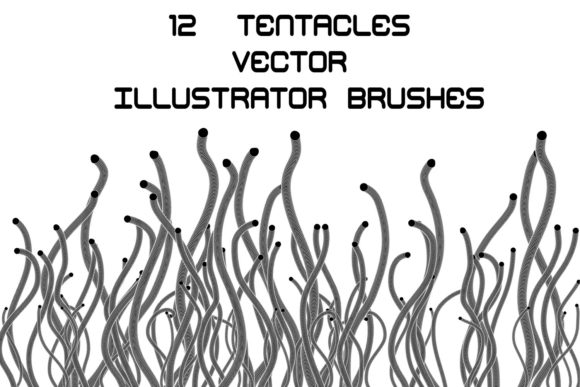
The core appeal of these brushes lies in their ability to mimic the look of sinewy, mechanical, or bio-mechanical appendages. They aren't just simple curves. When you apply a Tentacles Illustrator Brush, you get the appearance of intertwined cables, sleek robotic arms, or ethereal energy tendrils. The personality of this asset is distinctly modern, edgy, and technical. It evokes a sense of advanced technology or alien biology, making it perfect for projects that need a touch of the extraordinary.
The bundle includes 12 distinct brushes, split between 8 art brushes and 4 pattern brushes. The art brushes stretch along a path, creating the primary tentacle shapes, while the pattern brushes allow for repeating textures and segments, adding depth and detail to your lines. This variety ensures that you can create everything from a single, elegant tendril to a complex web of interconnected, futuristic vines.
Practical Applications: From Sci-Fi Illustrations to Branding
The versatility of these brushes extends far beyond simple doodles. Consider their use in editorial design for a tech magazine or a science fiction book cover. A few strategically placed tentacle strokes can instantly frame a headline, guide the reader's eye across the page, or create a compelling border that screams "futuristic." For logo design, a stylized tentacle can form the core of an icon for a cybersecurity firm, a biotech startup, or an esports team, offering a memorable and dynamic mark.
In the realm of packaging design, especially for products like energy drinks, video games, or specialty tech gadgets, these brushes can create arresting background patterns or foreground accents. They add a layer of perceived complexity and premium quality. For digital creators, the applications are just as powerful. Imagine using them in social media graphics for a podcast about artificial intelligence or a YouTube channel dedicated to space exploration. The brushes provide an instant visual shorthand for the subject matter, boosting engagement and brand recognition.
Enhancing Visual Hierarchy and Brand Perception
Using a specialized asset like the Tentacles Illustrator Brushes does more than just add decoration; it actively shapes how an audience perceives your work. In web design or a digital presentation, these dynamic lines can create a strong visual hierarchy. A thick, bold tentacle can draw immediate attention to a call-to-action, while finer, more intricate patterns can frame secondary information. This guides the viewer's eye with purpose and style.
For brand identity, consistency is key. If your brand operates in a niche that values innovation, technology, or the fantastical, incorporating these brush styles across your marketing materials—from website headers to email newsletters—builds a cohesive and professional image. It moves your brand away from generic templates and into a space of custom, thoughtful design. This kind of visual consistency fosters trust and makes your brand instantly recognizable in a crowded market.
Working with the Asset: Flexibility and Control
A major strength of this bundle is its adaptability. The files are compatible with a wide range of Illustrator versions, including CC, CS, and even EPS 8, ensuring accessibility for most designers. The ability to change its color, size, or thickness directly within Illustrator is crucial. You aren't locked into a single look. You can make the tentacles glow with a neon hue for a cyberpunk aesthetic, render them in stark black for a technical blueprint feel, or use subtle grays for an elegant, understated effect.
The inclusion of a PDF help file with screenshots is a thoughtful touch that lowers the barrier to entry. For those who might be new to using custom brushes, this guidance is invaluable. Furthermore, the note that you can make any brush for yourself in your Illustrator version highlights the asset's educational value. It’s not just a consumable tool; it’s a starting point for learning and creating your own unique design assets.
Choosing and Pairing Your Brushes
When integrating these brushes into a project, consider your overall font pairing and typography. The futuristic, often aggressive nature of the tentacles pairs best with clean, modern sans serif fonts or sharp, geometric serif fonts. A flowing script font might create an interesting contrast for a specific aesthetic, but generally, clarity and modernity in your typography will complement the brushes' style. Always test how the brush strokes interact with your text to ensure readability isn't compromised.
Evaluate the project fit carefully. Ask yourself: does this design need to convey motion, complexity, or advanced technology? If the answer is yes, then exploring the Tentacles Illustrator Brushes is a logical step. Start by using them sparingly as accents or borders before integrating them as core elements of a composition. This allows you to gauge their impact and ensure they enhance, rather than overwhelm, your primary message.
In summary, this brush bundle is a powerful piece of a designer's toolkit. It offers a specific, high-quality visual language that is difficult and tedious to replicate manually. By providing editable, versatile files, it empowers creators to produce professional, engaging, and thematic illustrations efficiently. For anyone working in genres that demand a touch of the futuristic or the fantastical, it’s an asset worth serious consideration.