Mastering Procreate Lettering with the Grid & Texture Set
The Anatomy of a Comprehensive Procreate Lettering Kit
Digital lettering in Procreate offers a freedom that traditional pen and paper can't always match—unlimited undo, effortless color changes, and the ability to experiment without wasting materials. Yet, starting from a blank canvas can feel daunting. This is where a well-structured Procreate Lettering, Grid, & Texture Set becomes an indispensable part of your creative toolkit. It’s not just a collection of random brushes; it’s a curated system designed to guide your workflow from initial sketch to final polished piece.
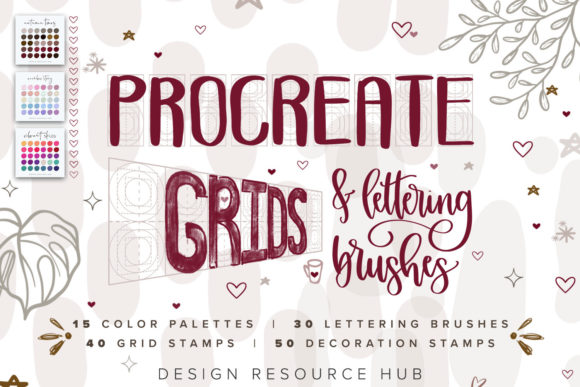
This particular set is built around 135 distinct elements, each serving a specific purpose. The core includes a variety of pencil and calligraphy brushes that respond dynamically to the Apple Pencil's pressure and tilt. You’ll find brushes that mimic the gritty texture of a graphite pencil for warm-up sketches and others that offer the smooth, flowing ink of a pointed pen for elegant script. The personality of these tools is one of authentic craftsmanship. They don’t feel like sterile digital vectors; they have a slight, natural variation that adds soul and a hand-made quality to your work, making them perfect for creating a genuine brand identity that connects on a human level.
Beyond the brushes, the inclusion of grid stamps is a game-changer for consistency. These pre-made guides for lettering—like baseline, x-height, and ascender lines—snap onto your canvas, allowing you to maintain perfect proportions and alignment across multiple words or a full composition. This is particularly valuable for editorial design projects or creating cohesive social media graphics where text needs to be legible and professionally structured. The texture stamps, meanwhile, add depth and character, letting you overlay subtle paper grain, ink splatters, or distressed effects with a single tap, elevating flat artwork into something tactile and engaging.
Practical Applications: From Brand Logos to Personal Projects
The true value of a creative font asset like this lies in its versatility. Imagine you’re a small business owner developing your logo design. You need a wordmark that feels unique and approachable. Using the script brushes from the Procreate Lettering, Grid, & Texture Set, you can sketch dozens of variations quickly, playing with flourishes and connections. The grid guides ensure your final chosen design is balanced. Once digitized, this custom lettering becomes the cornerstone of your brand identity, used on everything from your website header to packaging design.
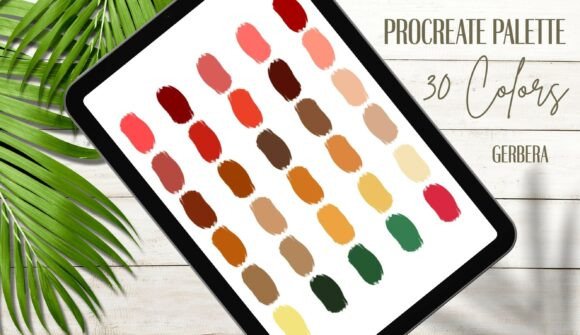
For marketers and content creators, this set is a powerhouse for producing eye-catching social media graphics and blog post titles. A bold display font created with the calligraphy brushes can grab attention in a crowded feed, while a delicate handwritten font style can convey warmth and personality in a quote graphic. The ability to quickly apply a texture stamp can make a promotional image feel more authentic and less like a stock template. Furthermore, the included color palettes—each with 30 carefully chosen hues—take the guesswork out of creating harmonious designs. You can import these directly into Procreate and have a cohesive color scheme ready to go, ensuring visual consistency across a campaign or a series of publications.
Hobbyists and crafters will also find immense joy in this kit. It’s perfect for creating custom artwork for your home, designing personalized greeting cards, or even drafting motifs for embroidery or vinyl cutting. The brushes are forgiving and intuitive, making them a great entry point for those new to digital art. Because the assets are designed specifically for Procreate and the Apple Pencil, the experience feels natural and responsive, bridging the gap between traditional and digital lettering practice.
Integrating These Tools into Your Creative Workflow
Choosing to incorporate a new set of design assets into your routine is about more than just the number of files. It’s about how they solve problems and enhance your output. The Procreate Lettering, Grid, & Texture Set excels by addressing common pain points. The grids solve alignment issues. The varied brush textures solve the problem of flat, one-dimensional digital lettering. The palettes solve color selection paralysis.
When evaluating if this set fits your projects, consider the style you’re aiming for. The brushes here lean towards a modern typography aesthetic with a handmade touch—ideal for brands and projects that want to feel contemporary yet personal. It’s a premium font toolkit in the sense that the quality and cohesion of the elements provide professional-grade results. For web design, you might use it to create standout hero text or promotional banners. For print design, like posters or flyers, the textures add a level of detail that holds up beautifully in high resolution.
A key piece of practical advice: font pairing is still crucial, even when creating custom lettering. If you’re designing a poster with a large, ornate script header created with these brushes, pair it with a clean, simple sans serif font for the body text to ensure readability. Test your lettering at different sizes to see how the details hold up. The brush strokes that look gorgeous large might need to be simplified for smaller applications. Remember, the goal is always clear communication.
Finally, the ease of installation cannot be overstated. The process of importing the .swatch color files and the brushes is straightforward—download, tap, and they’re ready in your Procreate library. This low barrier to entry means you can go from purchase to creating in minutes. For anyone looking to add a layer of professional polish, authentic texture, and structured guidance to their digital lettering, this comprehensive set provides the tools to do just that, transforming your iPad into a versatile lettering studio.