Glass Surface Texture Brushes Procreate: 48 Tools for Realistic Art
Adding Depth and Dimension to Digital Projects
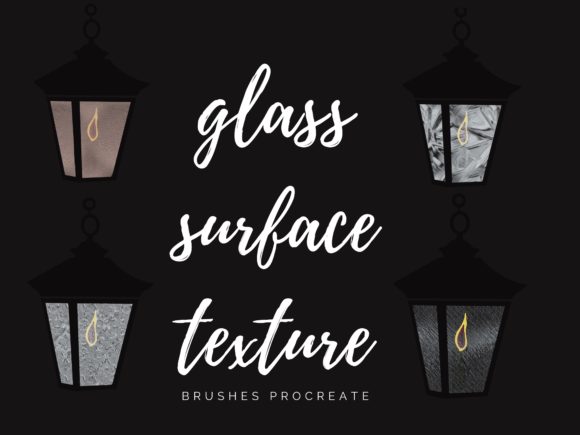
Creating digital art that feels tangible and real often comes down to texture. While flat colors and clean lines have their place, adding a layer of realistic texture can transform a good piece into a great one. The Glass Surface Texture Brushes for Procreate are designed to do exactly that. This collection of 48 brushes offers a specialized toolkit for mimicking the complex, light-reactive surfaces of glass. From the subtle frosted finish on a window pane to the sharp, refractive edges of a cut gemstone, these brushes provide the visual vocabulary to bring transparency, reflection, and depth into your work.
The personality of this collection is one of sophisticated realism. It doesn't just offer a generic "glass" effect; it provides the tools to articulate the specific style of glass you need. You'll find brushes that simulate the gentle haze of sandblasted glass, perfect for creating privacy screens or soft backgrounds. Others capture the bold, crystalline patterns of cracked safety glass, ideal for adding a dramatic, shattered effect. There are also brushes for clean, polished surfaces with subtle reflections, as well as tools for drawing the intricate leading found in stained glass windows. The overall appeal lies in its ability to add a layer of professional polish and visual interest that is difficult to achieve with standard brushes.
Practical Applications for Designers and Creators
The real-world value of these brushes extends far beyond creating standalone illustrations. For designers and content creators, they are versatile design assets that can solve specific creative challenges. Consider a brand identity project for a modern architecture firm or a luxury skincare line. Using the Glass Surface Texture Brushes to create abstract backgrounds or overlays can instantly communicate a sense of clarity, purity, and premium quality. The texture adds a tangible feel to digital presentations and mood boards, helping clients visualize the final product.
In editorial design and web design, these brushes are incredibly useful. A blogger or publisher can use them to create unique featured images or section dividers that catch the reader's eye. For packaging design, they can simulate the look of a glass bottle or jar, adding realism to product mockups. The applications are extensive:
- Social Media Graphics: Create eye-catching Instagram stories or Facebook posts with textured text overlays or background elements that stand out in a crowded feed.
- Logo Design: While not for the primary typeface, a subtle glass texture can be used within a logo mark or as an effect to give it a unique, modern edge.
- Digital Illustration: Essential for drawing anything from a superhero’s ice powers and magical portals to realistic still lifes featuring glassware and bottles.
- Personal Projects: Crafters and hobbyists can use them to design custom digital planners, invitations, or art prints with a professional, high-quality finish.
Integrating Texture into Your Design Workflow
Adding a new tool to your creative process should be seamless. The Glass Surface Texture Brushes are designed for straightforward integration. After purchase, you receive a download link. Simply download the files and, within the Procreate app, tap the "+" symbol in your brushes panel to import them. The collection is organized for easy access, so you can start experimenting immediately. Remember, these brushes are digital assets optimized for the Procreate App on an iPad with an Apple Pencil, which allows you to take full advantage of pressure sensitivity for varying opacity and texture intensity.
When evaluating how this collection fits your work, think about your need for visual hierarchy and audience engagement. A subtle frosted glass texture behind a block of text can improve readability on a busy background while adding a sophisticated design element. A sharp, cracked glass effect can draw the viewer's eye to a specific point in an illustration, creating a powerful focal point. The key is to use the textures with intention. They should support your overall message, not overpower it. For instance, in a marketing campaign for a tech company, a clean, polished glass texture reinforces ideas of innovation and sleekness. For a fantasy book cover, a more ornate, stained-glass texture can build a sense of wonder and antiquity.
Choosing the Right Tool for the Job
With 48 brushes in the set, the variety is a major strength. A practical approach is to spend time simply exploring each brush on a blank canvas. Test how they look at different sizes and with varying levels of pressure. See which ones feel most natural to your hand and style. This experimentation is crucial for understanding the full potential of the toolkit. You might discover that a brush you initially overlooked is perfect for adding a subtle glint to a character's eyes or for creating a unique pattern on a textile design.
While this is a creative font and texture collection rather than a traditional typeface, the same principles of thoughtful application apply. Just as you would carefully choose a serif font for a classic publication or a handwritten font for a personal blog, you should choose a glass texture that aligns with your project's tone. The included free procreate color palette of 60 colors is a valuable bonus, curated to work harmoniously with the textures, helping you create cohesive color schemes quickly. This saves time and ensures a polished result.
Ultimately, the Glass Surface Texture Brushes for Procreate are about expanding your creative possibilities. They provide a practical, high-quality solution for a common design need: adding realistic depth and light. By understanding their characteristics and experimenting with their applications, you can elevate your digital art, strengthen your brand identity