Exploring the Procreate Outline Lettering Hollow Brush
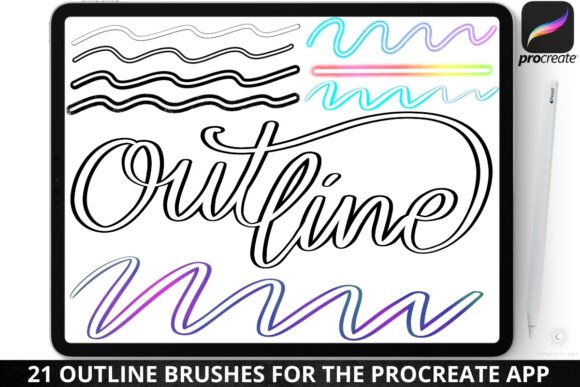
There is a specific kind of energy that comes from lettering that doesn’t rely on solid fills. It’s lighter, more intricate, and allows the background to become part of the typography itself. If you are working within the Procreate ecosystem, finding the right tools to achieve this without spending hours manually tracing paths can transform your workflow. The Procreate Outline Lettering Hollow Brush set is designed specifically for this purpose, offering a collection of 21 distinct brushes that prioritize the contour of the letterform over the interior space.
As a designer or content creator, you know that typography is rarely just about reading the words; it is about feeling them. Outline lettering creates a sense of airiness and modernity that solid blocks of text cannot always achieve. However, not all outline brushes are created equal. Many digital brushes simply lack the variation needed to create depth. This particular set addresses that by including styles ranging from clean monoline strokes to textured grunge and spray paint effects. This variety allows you to match the tool to the mood of your project, whether you are designing a sleek, minimalist logo or a gritty, vintage poster.
Dynamic Functionality and Dual-Color Mechanics
What sets this collection apart from a standard premium font or a static vector file is the behavior of the strokes. The brushes are engineered to be pressure sensitive, which means the weight of your line changes based on how hard you press your Apple Pencil. This is crucial for handwritten font styles and script font aesthetics, where flow and rhythm are dictated by the thickness of the stroke. A light touch yields a delicate hairline, while a heavy press creates a bold, impactful outline.
Furthermore, the "dual color" and "rainbow" variants add a layer of complexity that is difficult to achieve manually. By utilizing the tilt function of the Apple Pencil, you can blend two selected colors within a single stroke. This feature is incredibly useful for creating social media graphics or brand identity assets where gradient effects or multi-tonal palettes are trending. Imagine writing a headline where the pressure of the stroke shifts the color from a deep navy to a vibrant teal. It turns the act of lettering into a dynamic illustration process, giving your work a unique flair that static design assets simply cannot replicate.
Practical Applications Across Design Disciplines
The versatility of the Procreate Outline Lettering Hollow Brush makes it a valuable addition to various creative workflows. Here is how different professionals can utilize this set:
- Logo Design and Branding: Outline typography is a staple in modern logo design. It allows for a clean, professional look that sits well on top of photography or patterned backgrounds. Using the hollow brush to sketch initial concepts helps you focus on the silhouette and spacing of the letters before committing to color fills.
- Apparel and Merchandise: If you are a crafter or small business owner creating designs for print-on-demand, these brushes are ideal. The "clothing print" aesthetic often relies on distressed or textured lines. The grunge texture outline and spray paint outline styles can simulate the look of screen printing or embroidery, adding instant character to t-shirt graphics.
- Packaging and Editorial Design: In packaging design, hierarchy is everything. Using a hollow brush for subheadings or callouts can separate information visually without adding heavy ink coverage. Similarly, in editorial design, these brushes can be used for pull quotes or drop caps that need to stand out from the body copy of a serif font or sans serif font.
- Digital Content Creation: For bloggers and marketers, creating engaging visuals is a daily task. These brushes allow you to quickly annotate images, create stylized titles for YouTube thumbnails, or design Instagram Stories that feel hand-crafted and personal.
Evaluating Fit and Workflow Integration
When incorporating a new tool like the Procreate Outline Lettering Hollow Brush, it is important to test how it interacts with your existing assets. Because these brushes create open shapes, readability can vary depending on the complexity of your background. A busy background might require a thicker stroke (using the "wide dynamic outline") to ensure the text remains legible.
Consider the font pairing possibilities. Outline text often pairs exceptionally well with a solid, heavy weight font. For example, using the hollow brush for a main headline and pairing it with a bold display font for a subheading creates a strong visual hierarchy. The contrast between the empty space of the outline and the solid fill of the secondary text guides the viewer’s eye naturally through the layout.
It is also worth noting the practical workflow benefits. Since these are custom-made brushes designed specifically for the iPad Pro and Procreate app, they are optimized for performance. You can adjust the opacity and size sliders to fit your specific canvas dimensions, ensuring high-resolution output for both digital screens and print. Whether you are sketching rough ideas or finalizing a polished piece, the ability to quickly switch between a clean monoline for structure and a textured brush for flair streamlines the creative process.
Final Thoughts on Utility
The true value of a tool like the Procreate Outline Lettering Hollow Brush lies in its ability to bridge the gap between illustration and typography. It encourages experimentation. By allowing you to play with color dynamics and pressure sensitivity, it invites you to break away from rigid design rules and find a style that feels organic and expressive. For the designer looking to add a tactile, human element to their digital work, this brush set provides the necessary mechanics to do so efficiently and effectively.